Downgrade your ESXi Host

On rare occasions you may need to downgrade your ESXi host. In my case I was working on a VMware certification test and my host was using a newer build than what was called for. Or, maybe you run into a situation like the NFS bug earlier this year and needed to downgrade back to a stable ESXi version. Either way, it’s a fairly simple process do downgrade your ESXi host, all without losing your settings.

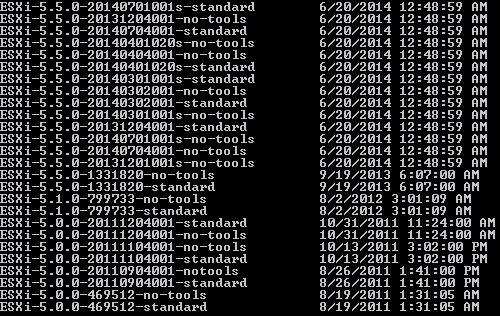
1. On a computer with PowerCLI installed run the following command. From the long list of profiles, pick the profile which you want to downgrade to. Some profiles have build numbers, while others have dates. So it may take a little digging to downgrade to exactly the build level you want. In my case I wanted ESXi 5.1 GA.

Get-EsxImageProfile | Sort-Object “ModifiedTime” -Descending | format-table -property Name,CreationTime
 

2014-08-12_15-01-12

2. Enable SSH on your ESXi host and then enter the following command, but replace the profile name with the one you want to downgrade to. After the profile downloads and installs, reboot the ESXi host.

esxcli software profile update -d https://hostupdate.vmware.com/software/VUM/PRODUCTION/main/vmw-depot-index.xml -p ESXi-5.1.0-799733-standard –allow-downgrades

And that’s it! I don’t know the official support stance on this, so just don’t go doing it on random production servers. But it saved my bacon today. If you are a Nutanix customer, this command will also work and preserves our CVM and custom ESXi host configuration information. Also remember that you might be able to use “shift r” during ESXi boot to restore your ESXi host to a prior installed version. This could negate the need to re-download the profile that you want. In my case the host was freshly imaged with a newer build so the “shift r” at boot was not of assistance.

VMware has a KB article on a similar procedure, and a support statement that you can check out here.


Related Posts

2 thoughts on “Downgrade your ESXi Host”

  1. This should be fixed:
    
     --allow-downgrades    If this option is specified, then the VIBs from the image profile which update,
                             downgrade, or are new to the host will be installed. If the option is not
                             specified, then the VIBs which update or are new to the host will be installed.
    
    Usage: esxcli software profile update [cmd options]
     
    Description:
       update                Updates the host with VIBs from an image profile in a depot. Installed VIBs may
                             be upgraded (or downgraded if --allow-downgrades is specified), but they will
                             not be removed. Any VIBs in the image profile which are not related to any
                             installed VIBs will be added to the host. WARNING: If your installation
                             requires a reboot, you need to disable HA first.
     
    Cmd options:
       --allow-downgrades    If this option is specified, then the VIBs from the image profile which update,
                             downgrade, or are new to the host will be installed. If the option is not
                             specified, then the VIBs which update or are new to the host will be installed.
       -d|--depot=[ <str> ... ]
                             Specifies full remote URLs of the depot index.xml or server file path pointing
                             to an offline bundle .zip file. (required)
       --dry-run             Performs a dry-run only. Report the VIB-level operations that would be
                             performed, but do not change anything in the system.
       -f|--force            Bypasses checks for package dependencies, conflicts, obsolescence, and
                             acceptance levels. Really not recommended unless you know what you are doing.
                             Use of this option will result in a warning being displayed in the vSphere
                             Client.  Use this option only when instructed to do so by VMware Technical
                             Support.
       --maintenance-mode    Pretends that maintenance mode is in effect. Otherwise, installation will stop
                             for live installs that require maintenance mode. This flag has no effect for
                             reboot required remediations.
       --no-live-install     Forces an install to /altbootbank even if the VIBs are eligible for live
                             installation or removal. Will cause installation to be skipped on PXE-booted
                             hosts.
       --no-sig-check        Bypasses acceptance level verification, including signing. Use of this option
                             poses a large security risk and will result in a SECURITY ALERT warning being
                             displayed in the vSphere Client.
       -p|--profile=<str>    Specifies the name of the image profile to update the host with. (required)
       --proxy=<str>         Specifies a proxy server to use for HTTP, FTP, and HTTPS connections. The
                             format is proxy-url:port.
    

Leave a Reply to kababoom Cancel Reply

Your email address will not be published. Required fields are marked *